

Understand GAM Anti-Malware Scan Error Codes
This topic explains the Gateway Anti-Malware (GAM) error codes that appear when Secure Web Gateway (SWG) fails to complete a malware scan and shows how these codes help admins identify the failure condition and resolve scanning issues. It also describes where to find malware scan logs in the SWG interface and how to interpret the error message format that appears when a scan does not complete successfully.
Access Malware Scan Logs in SWG
You can view log files on the user interface of an SWG appliance.
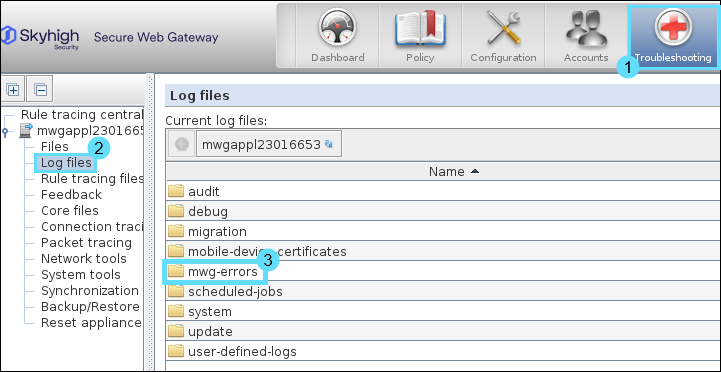
- Select the Troubleshooting top-level menu.
- On the appliances tree, select the appliance you want to view log files for and click Log files.
A list of log file folders appears, some of which contain subfolders. - Double-click the folder or subfolder with the log files you want to view.
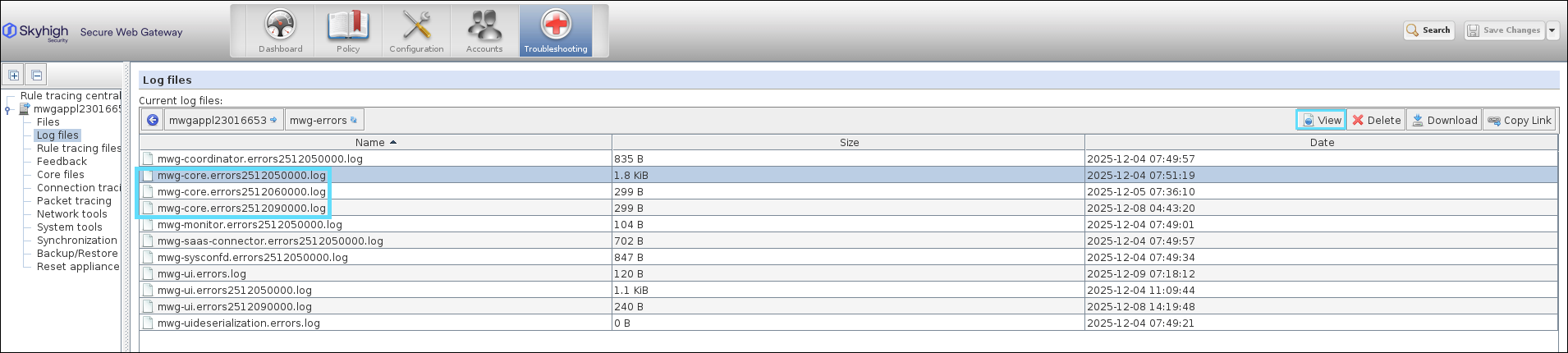
The folder opens to display log files. - Select the log file you want to view and click View on the toolbar above the list.
Identify GAM Error Codes in Log Entries
When a malware scan fails, the log displays a message similar to - Call to external Anti-Malware engine provided error: GAM code xxx
Interpret GAM Error Codes for Scan Failures
Use the following GAM error codes to interpret the value shown in the code field of the log entry.
| Error Code | Description |
|---|---|
| SUCCESS = 0 | Operation completed successfully. |
| ERROR_LOADFAILED - 1 | Libraries or DAT files are missing or corrupt |
| ERROR_ACCESSFAILED - 2 | The memory, or file on disk, to be scanned, is not accessible/readable |
| ERROR_SCANFAILED - 3 | Scanning of the file failed, due to an out-of-memory condition, or a timeout (resource constraints exceeded) |
| ERROR_NOTINITIALIZED - 4 | GAM_Scan etc. called with no preceding GAM_Initialize |
| ERROR_UNKNOWN - 5 | Any other sort of general, unidentified error occurred |
| ERROR_ALREADYINITIALIZED - 6 | Redundant call to GAMCLI_Initialize |
| ERROR_DEFERRED - 7 | Too early call to GAMCLI_Shutdown, there are still outstanding references |
| ERROR_NEEDMOREDATA - 8 | Occurs during stream scanning to signal the need for another chunk of data |
| ERROR_NOTSUPPORTED - 9 | Stream scanning was called on a file format where stream scanning is not supported |
| ERROR_ABORTED - 10 | Scanning has been aborted (e.g., during debugging) |
| ERROR_INVALIDPARAM - 11 | An invalid parameter was passed |
| ERROR_OUTOFMEMORY - 12 | Out of memory |
| ERROR_INVALID_URL - 13 | Invalid or no URL provided in request. |
| ERROR_TIMEDOUT - 14 | Scan could not be assigned to a scan worker pool. |
| ERROR_INVALIDMESSAGE - 15 | An invalid message has been received during the GAM client and GAM server communication |
| ERROR_CONNECTFAILED - 16 | The GAM client could not connect to the GAM server, or vice versa |
| ERROR_OVERLOAD - 17 | GAM Server queue is full |