

Configure Use DC Name from NTLM Handshake
The Use DC name from NTLM handshake setting directs the appliance to use the Domain Controller’s primary NetBIOS or DNS hostname during authentication. It prevents authentication failures that arise when you configure the appliance with an IP address, load balancer address, or DNS alias that does not match the Domain Controller’s actual primary identity.
If the appliance connects by using a hostname or IP address that differs from the Domain Controller’s primary name, the Domain Controller may reject the RPC connection and return a STATUS_INVALID_COMPUTER_NAME error. When you enable this setting, the appliance detects the Domain Controller’s validated primary hostname during the NTLM handshake and switches to that hostname for authentication, ensuring consistent identity validation and reliable connectivity.
After you enable this setting, the appliance communicates with the Domain Controller using its validated primary identity. This improves authentication reliability and prevents RPC failures caused by hostname mismatches.
Before You Begin
Enable this setting if your environment includes any of the following:
- A load balancer in front of multiple Domain Controllers
- Domain Controllers configured using IP addresses
- DNS aliases (CNAME records) for Domain Controllers
- Reverse DNS inconsistencies
Configure Use DC Name from NTLM Handshake
- Select Configuration > Appliances.
- On the appliances tree, select the appliance you want to join and click Windows Domain Memberhship.
A list of domains appears on the settings pane. It is initially empty. - Click Join to enter a domain into the list.
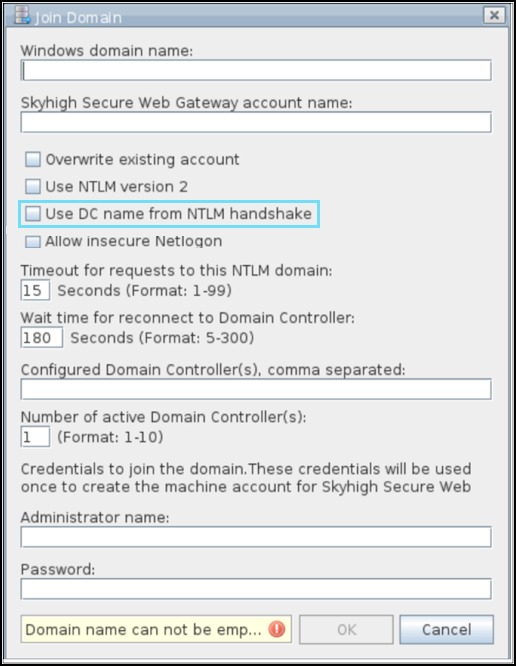
The Join Domain window opens. - Configure a domain name, a domain controller, and other settings in the window.
- Select Use DC name from NTLM handshake option to allow the appliance to use the Domain Controller’s primary hostname during authentication and prevent hostname mismatch errors.
- Click OK.
After You Enable the Setting
When the appliance initiates authentication, it establishes an SMB session with the configured Domain Controller endpoint. During the NTLM handshake, the Domain Controller presents its primary DNS or NetBIOS name. The appliance detects this name, updates the connection target, and uses the primary hostname for all subsequent RPC and authentication communication. This process ensures consistent identity validation and prevents hostname mismatch errors.