

Skyhigh Client Proxy (SCP) Secure Channel Fallback Mechanism
Skyhigh Client Proxy (SCP) includes a Secure Channel feature designed to encrypt communication between the client and the cloud proxy. To ensure users remain connected even when the secure channel is unavailable, administrators can enable a fallback mechanism. This feature allows the client to revert to the default port 8080 in case the primary secure channel connection fails.

Fallback Connectivity Workflow
When the secure channel is enabled, the SCP process begins by running a TCP connectivity test on the designated secure channel port. If this TCP test fails and the fallback option is disabled, SCP blocks all traffic with the reason Secure channel port not available" However, if the TCP test fails while the Allow Connection without Secure Channel option is enabled, the process proceeds using a non-secure channel to maintain connectivity. If the initial TCP connection on the secure port passes, SCP then initiates a mutual authentication test with the configured proxy over that secure channel. From this point onward, all rules that apply to a non-secure channel also apply to the secure channel.
Critical SSL Handshake Behavior
A critical caveat in this workflow is that the fallback mechanism relies entirely on the success or failure of the initial TCP connectivity test. To fully establish the secure channel, SCP must also complete a successful SSL handshake with the specific URL mcp.wgcs.skyhigh.cloud.

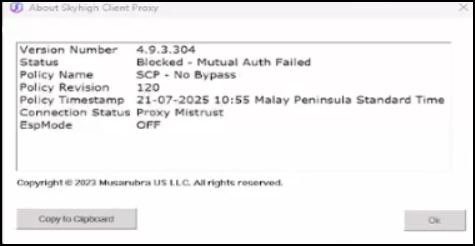
If the TCP connection succeeds but this SSL handshake fails, the fallback mechanism to port 8080 will not trigger. As the initial TCP test technically passed, SCP does not attempt a redirection, which results in the About Skyhigh Client Proxy status displaying Blocked - Mutual Auth Failed and a connection status of Proxy Mistrust.
Connection Outcomes Table
|
Scenario |
TCP Test |
SSL Handshake |
Fallback to 8080? |
Resulting Status |
|---|---|---|---|---|
| Port Blocked | Failed | N/A |
Yes (if enabled) |
Connected (Non-secure) |
| SSL Failure | Passed | Failed |
No |
Blocked - Mutual Auth Failed |
| Successful | Passed | Passed | No |
Connected (Secure Channel) |